 WatchDawg
See who can track you.
A passive, 100% local privacy informer for Chrome. It watches the page you're on and names the companies watching you — then shows what your installed extensions can access.
What it does
Trackers & owners
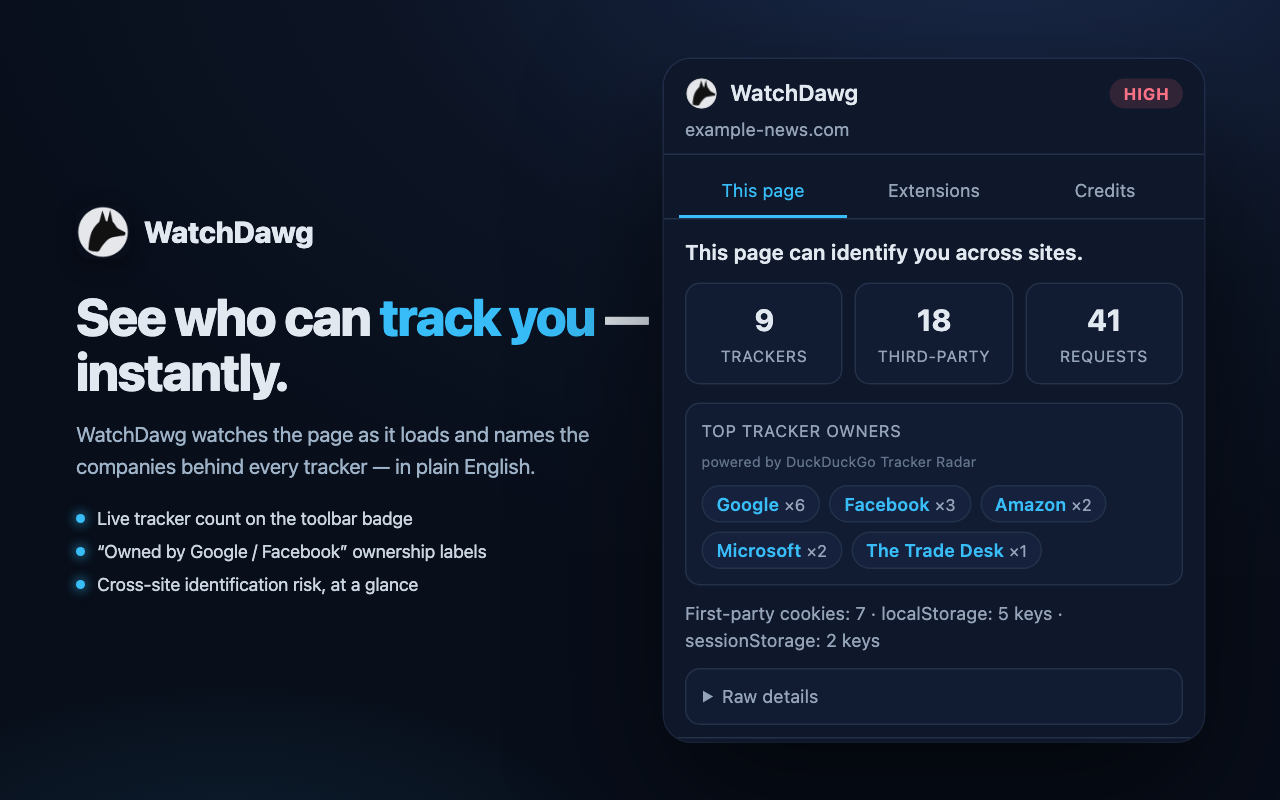
Counts third-party trackers on the current page and labels who owns them — “owned by Google / Facebook” — powered by DuckDuckGo Tracker Radar.
Cross-site risk
Plain-English risk read: tells you when a page can identify you across sites, with the raw request list one click away.
Extension capabilities
A capability-only audit of your installed extensions — what each one can access, based on declared permissions. Read-only.
100% local
No analytics, no telemetry, no storage. Per-page snapshots live in memory and vanish when you navigate away.
Install (developer / unpacked)
- Clone or download the repo from GitHub (or grab the latest release ZIP).
- Open
chrome://extensionsand turn on Developer mode. - Click Load unpacked and select the project folder.
- Pin WatchDawg, visit a content-heavy site, and click the icon.
Open data, fully credited
EasyPrivacy
Core is-tracker blocklist. Dual GPLv3 / CC BY-SA 3.0. © The EasyList authors.
DuckDuckGo Tracker Radar
Ownership labels. CC BY-NC-SA 4.0. © 2020 Duck Duck Go, Inc.
Disconnect
Categories & supplementary trackers. CC BY-NC-SA 4.0. © 2010–2026 Disconnect, Inc.
Loaded separately
The three datasets are bundled verbatim and reconciled in memory — never merged or redistributed as one list.